
 Matt
MattBest confidence monitor software free and online
The best free and online confidence monitor software is a browser-based stage timer like Stage Timer Online.
The best free and online confidence monitor software is a browser-based stage timer like Stage Timer Online. This type of tool allows a remote operator to control a timer and send messages to a speaker's screen using a simple web link. This approach requires no software installation and works on any device with a web browser, making it the most flexible and professional solution. For basic, single-presenter situations, the built-in "Presenter View" in PowerPoint or Keynote is a functional alternative, but it lacks the remote control and synchronization features needed for professional events.
Prerequisites
Before you begin, ensure you have:
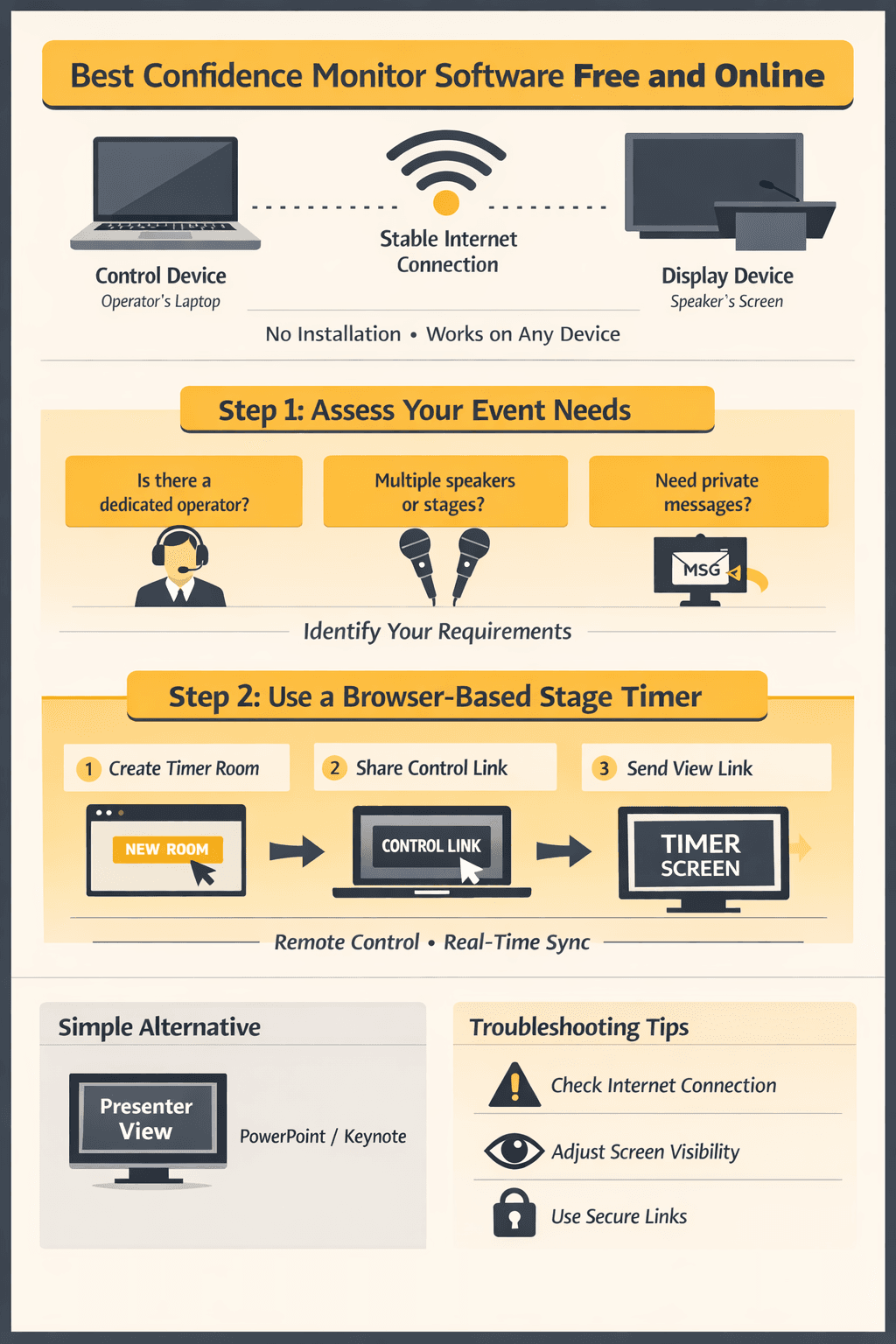
A Control Device
: A laptop or computer for the event operator to manage the timer.
A Display Device
: The screen the speaker will see, such as a laptop on the lectern or a large display at the back of the room.
A Stable Internet Connection
: This is required for both devices to ensure perfect synchronization when using a browser-based system.
Step 1: Assess Your Event's Requirements
WHY (Strategy): This step ensures you choose a tool that matches your event's complexity. A simple internal meeting has different needs than a multi-speaker live conference. Matching the tool to the task prevents technical failures and unnecessary complications.
HOW (Tactics): Determine your needs by answering these questions:
Is there a dedicated operator?
Will someone other than the speaker be controlling the timer, like a show-caller or stage manager? If yes, you need a system with remote control capabilities.
Are there multiple speakers or stages?
If yes, you need a centralized system that can manage multiple timers from one interface.
Do you need to send private messages?
Do you need to send cues like "Wrap Up" or "Move to Q&A" discreetly to the speaker? If yes, you need a system with an integrated messaging feature.
VALIDATION (Result): You will know this step is complete when you have a clear list of "must-have" features. For example: "I need a system with remote control for one operator and one speaker, with messaging."
Stage timer
Step 2: Deploy a Professional Browser-Based Timer
WHY (Strategy): This method is the industry standard for professional events because it provides centralized control, perfect synchronization, and maximum flexibility. Because it runs in a browser, it works on any device without software installation, eliminating compatibility issues.
HOW (Tactics):
Navigate to a browser-based platform like
Create a timer by clicking the prominent
Create a new room button on the homepage.
You will be taken to a control dashboard. From here, copy the unique links provided.
Share the Controller link with your event operator. This link provides access to the master control panel.
Share the View link with the speaker. This link opens a clean, full-screen timer display..
VALIDATION (Result): You will know this worked when the operator clicks Start on their device and the timer on the speaker's separate device begins counting down instantly and in perfect sync. Any messages the operator types will appear immediately on the speaker's screen.
Step 3: Use an Integrated Presentation Timer for Simple Events
WHY (Strategy): For solo presenters who are managing their own slides in a small-scale setting, like a team meeting or lecture, the timer built into presentation software is a sufficient, no-cost option.
HOW (Tactics):
In Microsoft PowerPoint
: Open your presentation. Navigate to the Slide Show tab in the top ribbon. Ensure the Use Presenter View checkbox is ticked. Connect your laptop to the secondary display (the projector or TV). Click the From Beginning or From Current Slide button to start your presentation.
In Apple Keynote
: Keynote enables Presenter Display by default when a second screen is connected. Click the Play button to start your slideshow. Customize the display by clicking the Presenter Display icon (a screen with two rectangles) in the top right.
VALIDATION (Result): You will know this is working when your laptop screen shows "Presenter View" (with the timer, speaker notes, and next slide) while the main audience display shows only the current, full-screen slide.
Troubleshooting: Common Issues and Solutions
Problem: The timer is lagging or not synchronized between devices. Solution: This is almost always a network issue. Ensure both the controller and viewer devices are on a stable, high-quality internet connection. For mission-critical events, connect the control computer via an Ethernet cable instead of relying on Wi-Fi.
Problem: The speaker cannot read the timer from the stage.
Solution: Most professional timer software allows for customization. In the settings, increase the font size and ensure the color scheme is high-contrast (e.g., white text on a black background). Also, ensure the physical display screen is large enough and positioned correctly for the speaker's line of sight.
Problem: An unauthorized person is interfering with the timer.
Solution: This happens when using insecure or overly simple platforms. Use a professional service like Stage Timer Online that generates unique, randomly-generated, and secure links for each timer room and view. If you suspect a link has been compromised, simply create a new room to instantly generate a new set of secure links.
The Convergence of Confidence Monitors and Teleprompters
In digital event production, the functions of confidence monitors (time and cues) and teleprompters (script) are closely related. Both empower the speaker with critical information. As such, an analysis of confidence monitor software must also address the adjacent market of teleprompting solutions.
📈 Best teleprompter software: A Strategic Overview
The "best" teleprompter software for a professional environment is defined by reliability, integration, and remote operation. The optimal choice offers:
Remote Control and Editing
: An operator must be able to control scroll speed, pause, and edit the script from a separate machine.
Network Synchronization
: Ensures the operator's and speaker's views are perfectly in sync.
Broadcast-Ready Features
: Includes text mirroring (for physical teleprompter glass) and customizable display options.
Platform Agnosticism
: Browser-based solutions are superior as they eliminate compatibility issues across PC, Mac, and mobile devices.
Teleprompter software free: Assessing the True Cost
While teleprompter software free solutions have no initial cost, they introduce significant operational risks. These include a lack of professional support, limited functionality (especially remote control), and potential security vulnerabilities. The time spent by staff troubleshooting free software often exceeds the cost of a professional, supported solution, making the Total Cost of Ownership (TCO) much higher.
The Rise of the Online Teleprompter
The teleprompter online modal represents the modernization of this technology. Browser-based teleprompters offer ultimate accessibility, eliminating software installation and maintenance. This architecture allows an operator to manage a script for a speaker anywhere in the world, representing the future standard for its scalability, flexibility, and reduced IT overhead.
Evaluating Teleprompter Software for PC and Mac
The need for both teleprompter software for PC and teleprompter software for Macan create friction. Platform-agnostic, browser-based solutions solve this by rendering the operating system irrelevant. The same application runs identically on any machine with a modern web browser, which simplifies training, deployment, and support.
The Functionality of a Teleprompter App
TelePrompTer App on a smartphone or tablet is designed for solo content creators recording video. While effective for that use case, these apps are not suited for live stage events due to small screen sizes and a lack of robust networking for remote control.
Understanding the Teleprompter Mirror Requirement
The teleprompter mirror function horizontally flips the text output. This is a non-negotiable requirement for software used with professional camera-mounted teleprompter hardware, which uses a beam splitter glass that requires a mirrored image to be readable.
Finding a Reliable Teleprompter Software Free Download
For those with an absolute need for a teleprompter software free download, the safest approach is to use reputable open-source projects from official repositories like GitHub to minimize malware risk. However, this requires in-house technical expertise for setup and troubleshooting and is not recommended for mission-critical events.
💡 The Impact of AI on Event Management and Delivery
Artificial intelligence is set to redefine event production. With global generative AI adoption reaching 16.3 percent of the world’s population according to Microsoft, and platforms like ChatGPT commanding 700 million weekly active users per the Web Almanac, audiences and production teams are ready for AI-driven enhancements.
For confidence monitors and teleprompters, AI offers high-value opportunities:
Automated Script Pacing
: AI could analyze a speaker's delivery and automatically adjust teleprompter scroll speed to match their natural cadence.
Real-time Content Summarization
: An AI could generate key takeaways on the confidence monitor, providing helpful cues for Q&A sessions.
Predictive Time Management
: By analyzing the remaining script and current pace, an AI could provide predictive alerts like, "You are running 5 minutes ahead of schedule."
Conclusion
Choosing the right confidence monitor software comes down to your event's specific needs. For professional productions requiring remote control and flawless synchronization, a browser-based system like Stage Timer Online is the definitive solution. For simple, solo-presenter scenarios, the tools built into presentation software are adequate. By following these steps, you can ensure your speakers stay on time, your team stays in sync, and your event runs smoothly.